
Archive for the ‘Programming the web’ Category

Scrum und Kanban.

Saturday, January 8th, 2011

Hier mal ein Sammlung von Artikeln über Scrum und Kanban, über welche ich in den letzten Wochen gestolpert bin. Alle lesens-, hörens- oder sehenswert. Weder ist sie sortiert noch hat sie Anspruch auf Vollständigkeit. Vielleicht aber ist für den einen oder anderen ja was interessantes dabei. Wer noch etwas hinzufügen will, darf dies gerne in den Kommentaren tun.

Gedittools – a new version

Tuesday, September 21st, 2010

First of all: Thanks to all folks using my Gedittools plug-in for Gedit! All the mails and comments and download stats show that I was not the only guy looking for missing functionality in Gedit. During the past week or so I found some time to improve the XML-highlighting mechanism for Gedittool:

In fact, I re-designed and implemented the algorithm to find and highlight XML-tags from scratch. It is now much faster in searching and highlighting.

All other features like

- counting search results
- highlighting marked words throughout the document
- integrating a meld-interface to compare / diff opened files

remain as they are. Feel free to download the plug-in at Github.

Gedittools - a plug-in for gedit

Teamviewer für iPhone und iPad.

Wednesday, July 14th, 2010

So, jetzt muss ich nicht mehr zurück ins Büro, wenn noch was dringendes ansteht und ich schon auf dem Weg nach Hause bin: Jetzt mach ich das übers iPhone, bzw. iPad. Denn für beide Geräte gibt es nun den TeamViewer als App zum Download. Für Privatanwender ist die Lizenz sogar kostenlos, für Unternehmen soll die Lizenz laut Golem ab 80 EUR kosten.

Es funktioniert erstaunlich flüssig und erlaubt alle Mausaktionen mit einfach zu lernenden Gesten. Die Verbindung über UMTS ist aber doch recht langsam, zumindest in meinen ersten Tests. Die Maus auf meinem Laptop bewegte sich ziemlich verzögert, während mein iPhone den Zeiger bereits an der richtigen Position wähnte. Im WLAN sieht das sicher anders aus.

Gedittools – a plug-in for gedit.

Wednesday, May 12th, 2010

Update September 21: The XML Highlighting algorithm has been re-implemented. Therefore, this feature is now much faster than before. Also, it is not triggered automatically. There is a new button in the toolbar to start XML highlighting.

During the past few weeks I extended gedit by several little plug-ins that I needed to have for my daily developer work. Now, I merged all those to one single configurable plug-in called gedittools.

It comes along with the following features:

  • XML highlighting: After hitting the highlighting button in the tool bar, the complete tree inside the file will be highlighted. Depending on depth different colors will be used.
  • Selection highlighting: After a double click on any word, all occurrances of the selected word will be highlighted throughout the whole current document.
  • Search selection count: After a double click on any word, all occurrances of the selected word will be counted and the sum will be displayed in the status bar of the document.
  • Launch meld to compare files: A button is added to the toolbar of gedit to allow launching meld. Therefore a screen will be displayed: It allows selection of a file which will be compared to the current active file in gedit.

The plug-in is configurable: You can choose which plug-in you want to use. To make use of the meld launcher feature, an installation of meld is required. Refer to the README file for details.

Download here

If you want to use the plug-in, feel free to download it at github: http://github.com/mmuell23/mmuell23

To install from git:

git clone http://github.com/mmuell23/mmuell23.git
cp -r mmuell23/gedittools/* ~/.gnome2/gedit/plugins

Activate plug-in in gedit preferences and configure it as you wish.

Install from zip File:

You might also download the plug-in as a zip file from github. Hit the “download source” button on the top right of the site.

Extract all files and copy to ~/.gnome2/gedit/plugins

Activate plug-in in gedit preferences and configure it as you wish.
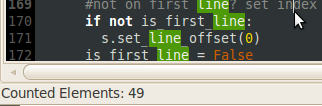
Plug-ins for gedit: count results or compare files.

Wednesday, April 28th, 2010

Well, after I could count words in a gedit document based on a selection I made, I decided to add another missing feature:

I needed a diff tool to compare two files that are currently opened in gedit. Unfortunately, gedit doesn’t come along with these kind of features. So, another plug-in was needed.

Meldlauncher

What it does? It simply starts the open source diff & merge tool Meld using two documents opened in gedit. That’s why I called it meldlauncher. Therefore, if you want to use meldlauncher, you will need to have Meld installed. On Ubuntu do something like this:

sudo apt-get install meld

If there are only two documents opened in gedit, meldlauncher will launch Meld and pass those two files to it. If there are more than two documents opened, meldlauncher will open a selection dialog from which you can easily choose the document to compare the current document with.

I moved both the counter plug-in and the meldlauncher plug-in to Github. Feel free to grab it from there:

http://github.com/mmuell23/mmuell23