Posts Tagged ‘gedit’

Gedittools – a new version

Tuesday, September 21st, 2010

First of all: Thanks to all folks using my Gedittools plug-in for Gedit! All the mails and comments and download stats show that I was not the only guy looking for missing functionality in Gedit. During the past week or so I found some time to improve the XML-highlighting mechanism for Gedittool:

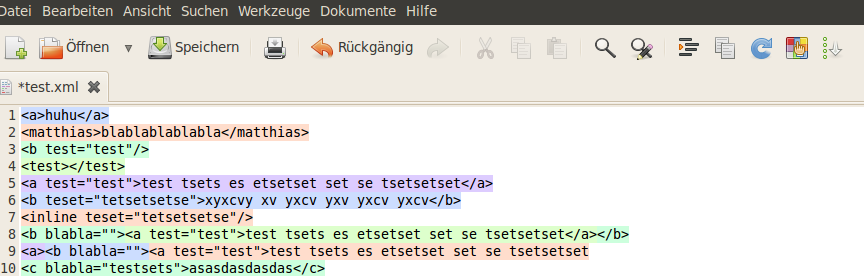
In fact, I re-designed and implemented the algorithm to find and highlight XML-tags from scratch. It is now much faster in searching and highlighting.

All other features like

- counting search results
- highlighting marked words throughout the document
- integrating a meld-interface to compare / diff opened files

remain as they are. Feel free to download the plug-in at Github.

Gedittools - a plug-in for gedit

Gedittools – a plug-in for gedit.

Wednesday, May 12th, 2010

Update September 21: The XML Highlighting algorithm has been re-implemented. Therefore, this feature is now much faster than before. Also, it is not triggered automatically. There is a new button in the toolbar to start XML highlighting.

During the past few weeks I extended gedit by several little plug-ins that I needed to have for my daily developer work. Now, I merged all those to one single configurable plug-in called gedittools.

It comes along with the following features:

  • XML highlighting: After hitting the highlighting button in the tool bar, the complete tree inside the file will be highlighted. Depending on depth different colors will be used.
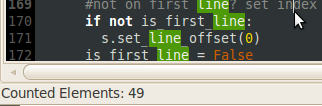
  • Selection highlighting: After a double click on any word, all occurrances of the selected word will be highlighted throughout the whole current document.
  • Search selection count: After a double click on any word, all occurrances of the selected word will be counted and the sum will be displayed in the status bar of the document.
  • Launch meld to compare files: A button is added to the toolbar of gedit to allow launching meld. Therefore a screen will be displayed: It allows selection of a file which will be compared to the current active file in gedit.

The plug-in is configurable: You can choose which plug-in you want to use. To make use of the meld launcher feature, an installation of meld is required. Refer to the README file for details.

Download here

If you want to use the plug-in, feel free to download it at github: http://github.com/mmuell23/mmuell23

To install from git:

git clone http://github.com/mmuell23/mmuell23.git
cp -r mmuell23/gedittools/* ~/.gnome2/gedit/plugins

Activate plug-in in gedit preferences and configure it as you wish.

Install from zip File:

You might also download the plug-in as a zip file from github. Hit the “download source” button on the top right of the site.

Extract all files and copy to ~/.gnome2/gedit/plugins

Activate plug-in in gedit preferences and configure it as you wish.

Plug-ins for gedit: count results or compare files.

Wednesday, April 28th, 2010

Well, after I could count words in a gedit document based on a selection I made, I decided to add another missing feature:

I needed a diff tool to compare two files that are currently opened in gedit. Unfortunately, gedit doesn’t come along with these kind of features. So, another plug-in was needed.

Meldlauncher

What it does? It simply starts the open source diff & merge tool Meld using two documents opened in gedit. That’s why I called it meldlauncher. Therefore, if you want to use meldlauncher, you will need to have Meld installed. On Ubuntu do something like this:

sudo apt-get install meld

If there are only two documents opened in gedit, meldlauncher will launch Meld and pass those two files to it. If there are more than two documents opened, meldlauncher will open a selection dialog from which you can easily choose the document to compare the current document with.

I moved both the counter plug-in and the meldlauncher plug-in to Github. Feel free to grab it from there:

http://github.com/mmuell23/mmuell23

Count search results in gedit.

Tuesday, April 20th, 2010

Update September 21:
After all, I found some time to reimplement the algorithm for highlighting XML. It is now triggered by a new button in the toolbar. As it now does not run automatically, this will be another improvement to overall speed. Feel free to download the new version at the provided download link below or at github!

Update May 5:
Count results are now being displayed in the Status Bar instead of an alert window. Also, there were a couple of bug fixes. Feel free to download the new version at the provided download link below or at github!

Lately I was looking for a small but missing feature in gedit: I needed to be able to count all occurrances of a selected word. This is a standard feature in many other editors such as Notepad++ in the Windows world, for example. However, I didn’t come across a solution on the net, so I decided to write a little plug-in myself.

What it does: After marking a word the plug-in counts all occurrances of the selection in the current document. It adds a new button to the toolbar and an entry to the menu right in the “Search” section. On top of that you may trigger counting the selection by hitting “CTRL+SHIFT+F”. A small pop-up window will appear and show the results of the search. The results will be displayed in the status bar of the window.

How to use it: Simply mark a word, and have a look at the statusbar: The number of search results will be displayed there.

If you find it useful, feel free to download the plug-in here:

Donwload at github:

http://github.com/mmuell23/mmuell23

git clone http://github.com/mmuell23/mmuell23.git
cp -r mmuell23/gedittools/* ~/.gnome2/gedit/plugins